AnimHuT
  • Articles
    • Other Topics
    • Picture Of The Day
    • Review
    • Viral Videos
  • Contest
  • Freebies
    • Brushes
    • Font
    • Icons
    • Infographics
    • Patterns
    • Photoshop PSD
    • Textures
    • VECTORS
    • Wallpaper
  • Inspiration
  • Photography
  • Themes
    • Plug-ins
    • WordPress Themes
  • Tutorial
    • After Effects
    • Codex
    • Flash
    • Illustrator
    • Photoshop
      • Text Effects
    • Quick-Tip
Home » Photoshop » Photoshop: Create a party ball style photo-manipulation
Aug18 21
Photoshop: Create a party ball style photo-manipulation

Photoshop: Create a party ball style photo-manipulation

Posted by Sipi Sagar in Photoshop, Tutorial

email
print

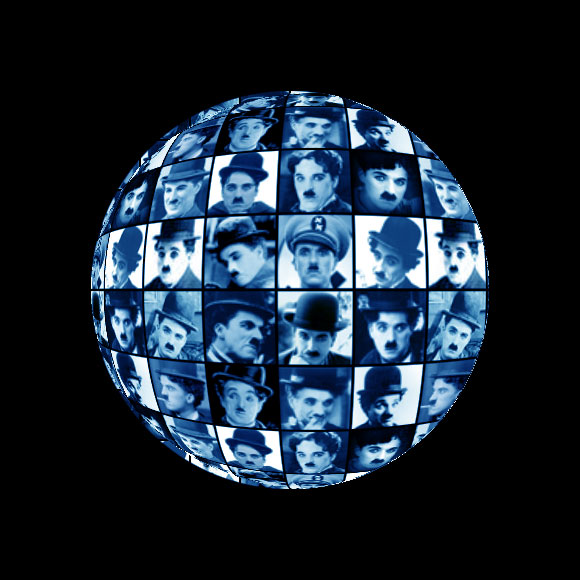
Hi readers, this is one more different tutorial from animhut regarding photo manipulation. In this tutorial we are going to see how to create a party ball style photo-manipulation. Okay now let’s go into the tutorial and hope you all enjoy it.
Preparation: First of all collect 16 pictures or photographs of related subjects so that we can have a theme in it. I have collected 16 Charlie Chaplin pictures.

Preview
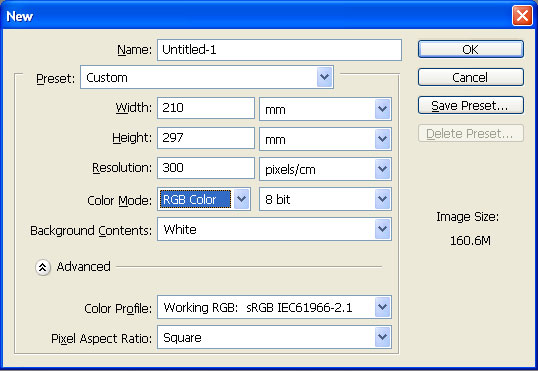
Step 1

Open an A4 size document with 300 pixels/cm resolution.
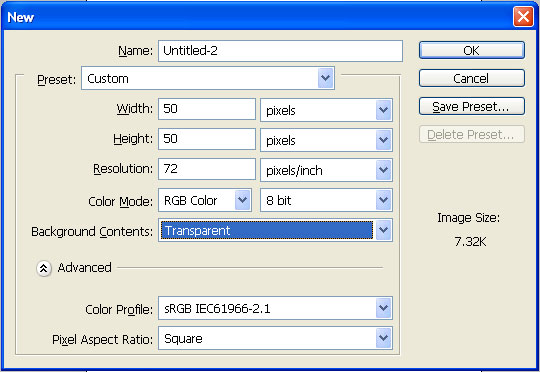
Step 2

Now open one more document of size 50 px X 50 px of 72 pixels/inch resolution and transparent background.
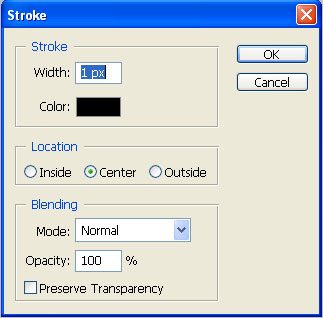
Step 3

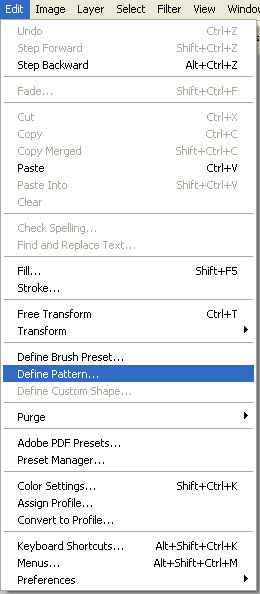
Press Ctrl+A to select the entire area and now go to Edit->Stroke and the Stroke dialog box opens up. Choose black color in it and center in it of size 1 pixel. Then go to Edit->Define Pattern and save it as a pattern.

Step 4

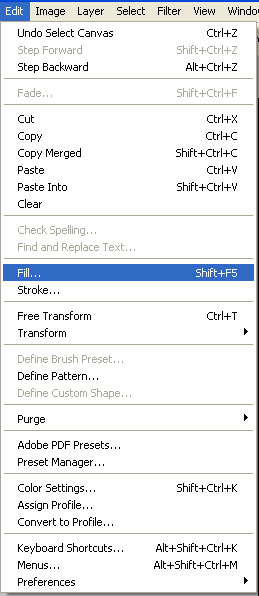
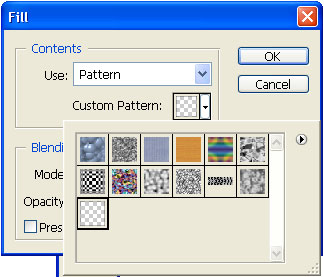
Now open up a new layer in the A4 size document. Go to Edit -> Fill and choose Pattern fill in that and choose the pattern that we have created now.

Step 5

Now open all the 16 photos you have collected. Take the crop tool. Select 48 px X 48 px with 300 pixels/cm resolution and start cropping them in square shapes.

Step 6

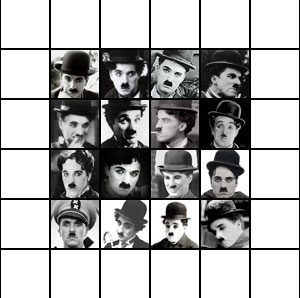
As you crop those images drag drop them into your A4 size document one by one and make sure that it each picture fits in each square box like this. You must place them in 4 rows and 4 columns such that all the 16 pictures are fixed in 16 squares.
Step 7

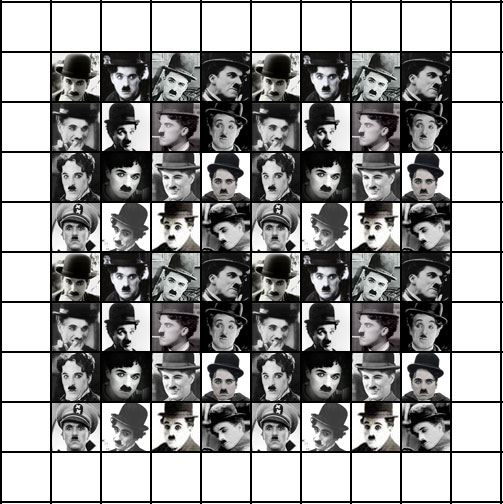
Now group all those picture layers together. Then take 4 copies of that group and place it in a manner such that you are able to fill 8 rows and 8 columns totally filling 64 squares.
Step 8

Now take a copy of all those groups and merge them together into one layer and hide all other groups including the background.

Step 9

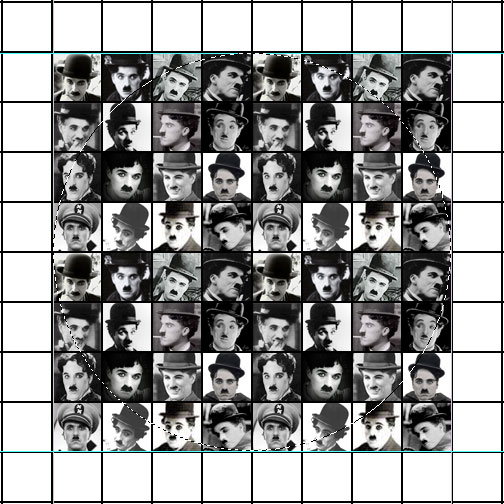
Now select the merged layer. Make a perfect circular selection suct that it touches all the four sides of the square box that has been filled with pictures.
Step 10

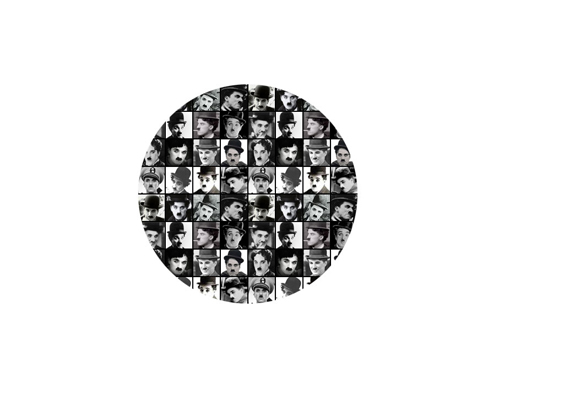
Now press Ctrl+shift+I to make invert selection and delete rest of them. Once again press Ctrl+Shift+I to come back to the same circular selection.
Step 11

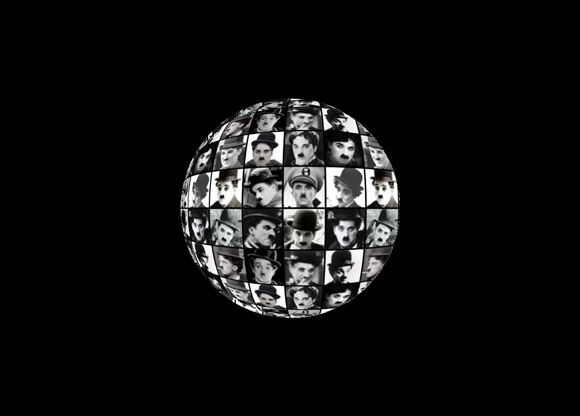
Now go to Filters->Distort->Spherize and give the following settings. Amount: 100, Mode: Normal
Step 12

Now go to Image->Adjustments->Desaturate and desaturate that layer. Then create a new layer above it and fill it with blue color completely and the change blending mode to color.

That’s all you have created a party ball style photo-manipulation.

BOOKMARK AND SHARE THIS TUTORIAL


0

Written By: Sipi Sagar

Currently working as a corporate trainer for various international companies and universities or schools that deal with business, design, advertising and media and now have got settled as a permanent faculty at Arena Animation Academy, Koramangala. Also working as a freelancer in web designing for the past 2 years. Specialized in web designing, flash applications and 3d architecture.

  • http://www.designjuices.co.uk jared thompson

    what a great idea for a tutorial.

    • Sipi Sagar

      Thank you Jared. Thank you for your comments and continuous support.

  • http://warstwy.com adone

    Congrats:) Very good tutorial:)

    • Sipi Sagar

      Thank you adone. Thanks for your comments.

  • vasudevan

    superb……..

    • Sipi Sagar

      thank you vasu. happy that you visit animhut regularly.

  • http://artfans.info Fandy

    Simple and useful, nice tutorial :)

    • Sipi Sagar

      Thank you fandy. Your website ArtfanDesign and posts in that also rock.

  • http://webexpedition18.com Nikola Lazarevic

    Nice tut!

    • Sipi Sagar

      Nikola has returned after long time. thank you.

  • http://richworks.in Richie

    Good idea… U might want to work on the shadows and highlights a little more (using burn and dodge tools respectively)… to get a realistic feel… because it appears very 1-dimensional =)

    Good work though!

    • Sipi Sagar

      Richie is also back after some time. Yeah as you told i must have highlighted the top right corner so that it gives more 3d effect.

  • http://artatm.com Rocky

    Very Good Tut, mate!!!

    • Sipi Sagar

      Hi rocky, thanks for the comments and everlasting support.

  • http://www.tutoriallounge.com Tutorial Lounge

    really cool tut.

    • Sipi Sagar

      Thank you Tutorial Lounge. Yuor last post about 40 best resources to get photoshop updates was very useful.

  • karthikeyan

    hey very good tutorial bro….

  • http://www.usbmemorysticks.net Dennis

    I find the tutorial really interesting,.I just basic in photo editing and i will try this tutorial later on. the image is really cool thanks for imparting it buddy :)

    • Sipi Sagar

      thank you dennis. stay in touch with animhut for more of these kinds of stuff.

  • http://flyertemplates.prowebmedia.net flyer templates

    Very useful technique. And it’s not that complicated to do. The only part that requires more work is cropping the pictures and positioning them in the squares.

    Will be useful. Thanks.

  • http://www.logoonlinepros.com Online Logo Design

    Wow absolutely brilliant great  inspiration ,Thanks for sharing this useful tutorial here with us .

Our Advertisers :

Subscribe to AnimHuT (it’s Free)

Add Animhut on  Google plus animhut Free  Email Subscription for design updates animhut on twitter Animhut rss subscription for latest Updates Join our Official  Facebook Page Animhut Flickr Pool

Our Facebook Official Page
Follow @animhut

Latest Post From the Blog

  • Blog Article: How to Find the Top Talent for your Start-up
  • 2012 Facebook Update: New Image Slideshow like Google Plus
  • Today’s Google Doodle : Charles Dickens 200th Birthday
  • Inspiration: 2012 Fresh Caricature on Popular Celebrities
  • Inspiration: Mid 1970′s like Illustrations by Jorge Mascarenhas
  • Miniature Wonderland – Creative Macro Photography Inspiration
  • Inspiration: Innovative and Creative Motion Reel by Jimmy Yuvan

Archives

Community News

  • Etched text effect using Photoshop

    Here is a very easy to follow tutorial to help you easily do it for any kind of color booklet…

  • 10 Best Clothing Website Designs

    Clothes were made initially to keep us warm and also function as a form of protection. However, since then it…

  • 35 Charming and Romantic Wallpapers That Make You Fall In Love

    Love is the most important part in ones life. Even today, in these turbulent times, love always finds a way…

  • Computers Arts Collection Vol 1 – Graphic Design

    Computer Arts Collection is brand new annual series of six comprehensive guides coming from the authors of Computer Arts, and…

  • 20 Cool Battery PSD Templates, Icons, Tutorials

    PSD Templates are an important element which contributes to impressive and effective graphic design. Creating an battery icon isn’t easy…

●● We Recommended ●●


● Best Web Hosting Review
● Best Web Host Companies
● Review BlueHost
● China wholesale
● factory
● Free Website Design
● Website builder
●Mactheripper
● Coupon Codes
• Freelance Web Designer
• Direct TV Packages
● InternetPhonePackage.com
•Best WordPress Themes
•iPage Web Hosting
● Web Hosting Services
●Youtube to MP3

Search by Tags

ANIMHUT art history Articles caricature character design Contest Daily Photography Daily photos design history digital painting Flickr Freebies Funny Videos google google doodles graphic design Icons illustration Illustrator InfoGraphics Inspiration Inspriation mascot Patterns Photography Photogrphy Photoshop Photoshop tutorial Poster Project365 Quick-Tip Review roundup sriganesh stock image stress buster Texture Tutorial twitter VECTORS Videos Viral Video Wallpaper Wordpress wordpress theme

Hall of Fame :

Friends

  • AdmixWeb
  • ArtAtm
  • BloggerJet
  • CreativeOverflow
  • DesignModo
  • Designrfix
  • Desizntech
  • Graphik Design Agency
  • Logolitic
  • Orphicpixel
  • premiumpress coupon code
  • Skyje
  • Smashingshare
  • Underworldmagazines
  • Visionwidget
  • Webdesignfan
  • Webexpedition18

Pages

  • DESIGN NEWS
  • Who We are ?
    • Authors
  • | CONTACT |
  • Site Map
  • Follow us
    • Google +
    • Like AnimHuT fan page
    • @animhut (Twitter)
    • StumbleUpon Profile
    • Add me on Facebook

© 2009-2012 AnimHuT | Designed by Elegant Themes | Powered by WordPress| Sherweb