
THE SMALL TUTORIAL ON HOW TO MAKE 125*125 BANNER ADS FOR THE WEBSITE IS VERY EASY AND SIMPLE ONE. THE BASIC THING IS TO THE USER SHOULD KNOW ABOUT THE SOFTWARE HANDLING, AND IN ADOBE PS ITS VERY EASY.
THIS TUTORIAL IS POSTED AS PER REQUEST FROM RICKY:(blogger)
LETS JUMP INTO THE TUTORIAL:
STEP 1:
YOU CAN USE ADOBE CS2 TO CS4 VERSION. BUT IN CASE IF U USE ADOBE PHOTOSHOP-CS2 YOU HAVE TO TOGGLE BETWEEN PHOTOSHOP CS2 AND IMAGE READY.
NOW USING Ctrl+N open the new document and give the following values in the dialog box: width 125 px, height 125 px, and resolution 72 ( for web its better use 72, for less file size.
Step 2 :
Here iam going to make gradient background. Take the gradient tool (G), and choose linear gradient mode, by default it will same, but in some case there may be radial mode. Use your favourite colors or similarly to your website/blog theme, it make the ad cool and attractive. And drag the tool from the top to bottom of the document size
Step :3
Create a new layer Ctrl+Shift+N, hit enter. Fill it with slight black colour, by choosing or pressing (D ) and now press Alt+ backspace to fill the foreground color.
Step :4
Using type tool (T), type your site name or anything you like. Just make it two text layers like tech and genuine is two text layer, it helps in animating later.

Step:5
Now we have text and background, we need to add some simple effect during animation, so create a new layer above all the layer , name it shade and fill it with blue and change the blending mode to overlay.
And create a new text : advertise here. (optional) now the layer palette will look like this.
.
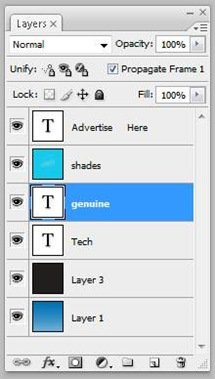
Step : 6 now we have finished with editing , so move on to animation part. From windows menu choose animation [ windows-> animation]
Now add new layer from the animation window panel and add upto five. There is no restriction how many frames you can do it, but more frames more file size. Note: in layer palette all the layers should be enabled.
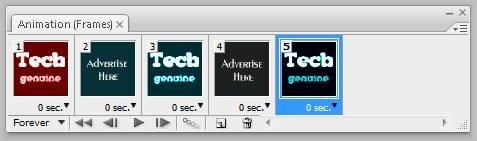
You will come to see in five frames all the layers will be enabled. Now one by one select the animation frame window and disable the text layer in the layer palette.

Follow this steps for remaining 4 frames and can have simple effect with the background in each layer, so in each frame change the blending mode of the shade layer to Saturation, overlay, color , hue, colour burn. Now press the play button. Gosh it animate very fast , you have to control the speed of the frame by right –click on the any one frame and increase the frames to 0.5 or 1 sec. Similarly change the time for every frame according to your needy. [0.5,1,1,0.5,0.2 sec] .

Step :7
You can add many frames u like , so “advertise here” layer can be animated if you want, you can enable it or disable it by the same procedure.
Step:8 [final]
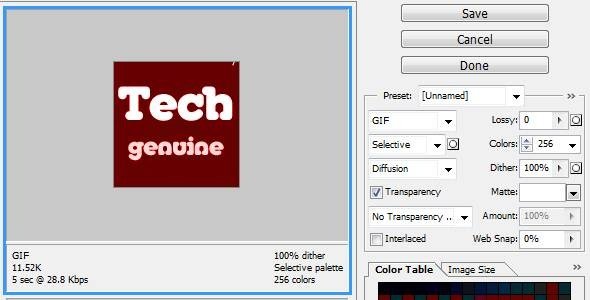
Now the final steps for saving it as gif. Alt+Ctrl+Shift+S ( save for web devices) and choose 4up panel and choose gif file among other file format and leave the settings. And press save button to save the file in animating format. The save for devices helps to decrease the file size*.
Conculsion:
This is very easy steps. and you can play with your creativity. And show your works here leave in comment form. I know this is very simple, even though it will be helpful for the beginners. Mostly i do in flash and while psd you can add images color effects or simple ads without animation.
Final output:



Hi Ganesh,
Thank you very much for posting it. I really like it. I’ve an offer for you. Create 125×125 banner of your website and pass it to me. I’ve received your comment, i’ll accept it later. One request my purpose was to create a advertisement banner for my website so I can advertise it on other blogs. Can I put my image (gravatar) as a background?
Thank you very much for your valuable time.
your welcome. ya u can put your avatar in background the same way , but where ???.i cant understand.i have made it in swf files, can i give it.
Email me. Send your banner too, I’ll put it on my website 🙂
I’ll give you more details later. I’ll include your post in weekly link party.
Happy blogging!!!
nice and simple post, i never thought there will be a option in ps. i used other 3rd party software
.-= kumar´s last blog ..Cloudy Sky Textures =-.
nice simple tuts, thanks for sharing
i learned new technique. i used other 3rd software to make animation gif,but it is with limitation,. here no problem
Trust me, this is really helpful for me ! Thanks a ton for publishing this article ! 😉
.-= S.Pradeep Kumar´s last blog ..Free Portable Applications For Your USB Flash Drives =-.
your welcome buddy
good tutorial… I always use photoshop to make animated banner
.-= Tutorial Blog´s latest blog ..Menampilkan Tulisan Acak (Random Text) =-.
thanks for the comment 😀 ,
Nice tutorial! I have a question–when I save it as a gif, why in 4-up? And then when I click on the gif to view it, PS tells me it can only view one frame. How do I view it without PS?
great toturial
thanks a lot
.-= SmashDesign´s latest blog ..Links for 2010-01-21 [Digg] =-.
Nice tutorial!
Very useful and easy to follow. Thanks!