AnimHuT
  • Articles
    • Other Topics
    • Picture Of The Day
    • Review
    • Viral Videos
  • Contest
  • Freebies
    • Brushes
    • Font
    • Icons
    • Infographics
    • Patterns
    • Photoshop PSD
    • Textures
    • VECTORS
    • Wallpaper
  • Inspiration
  • Photography
  • Themes
    • Plug-ins
    • WordPress Themes
  • Tutorial
    • After Effects
    • Codex
    • Flash
    • Illustrator
    • Photoshop
      • Text Effects
    • Quick-Tip
Home » Photoshop » Quick-tip: Create a Vintage effect in 2 Steps
Jun09 15
Quick-tip: Create a Vintage effect in 2 Steps

Quick-tip: Create a Vintage effect in 2 Steps

Posted by Sri Ganesh.M in Photoshop, Quick-Tip

email
print

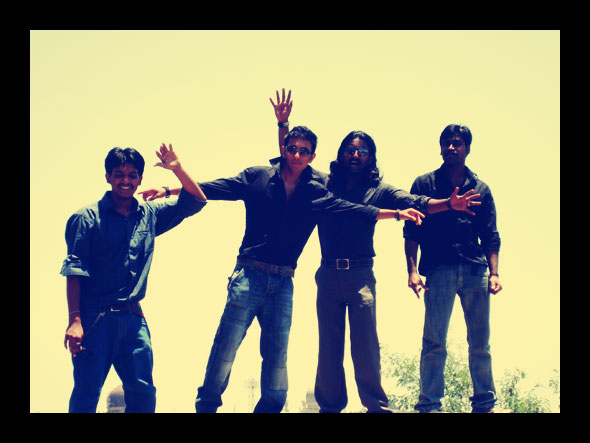
Every one like to change modern images into old photo effects, there are few names mentioned them- one is Vintage photo effect. Today we are going to learn vintage effect in just two steps. From our last post on quick tip has given a great success and so we try our best to make tutorials within 5 steps!! In each category!
I have included a Optional step to give you a change to play with layer mode!!
From internet you can find many tutorials to make retro and vintage effects, but this one is different from others, this tutorial mainly to accomplish on newbies and other non-designers who want their photo to make vintage effect in seconds – any suggestion ! hate ! love ! pass on to us.
Step :1
Open an Image in the Photoshop. You can have any type of colour Image.

Shortcut key : Ctrl+O | File-> open.
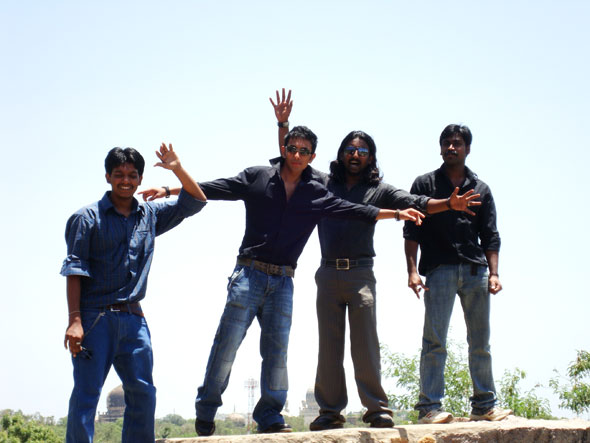

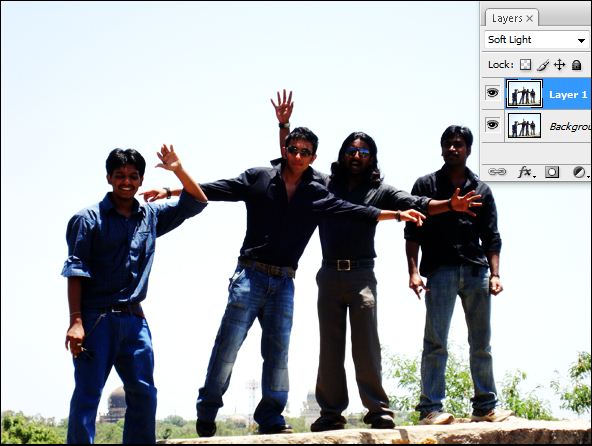
Now Duplicate the Original image by Ctrl+J and change the Layer mode to SOFT LIGHT
Preview :
Step : 2

Create a NEW layer Ctrl+N and fill the layer with #000d53

Preview :

fill colour

Now change the layer mode to Exculsion
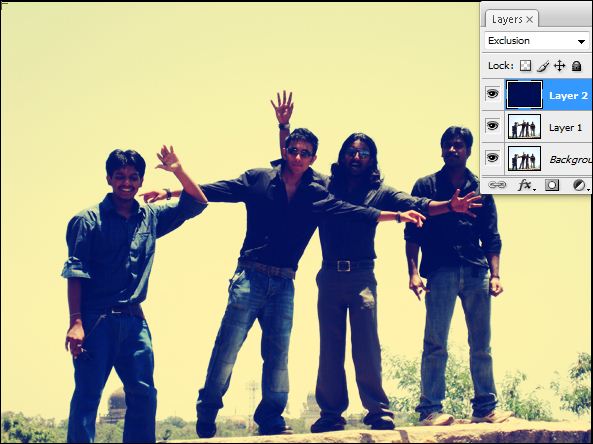

yes ! we are done ! is that simple and effective !!
Note: i hope you like this effect !! There is different way to create a retro and vintage effect. We will give you more quick tip in future post.


Optional step :

Create a border

create a new layer and press Ctrl+A and without deselction press ALT+S+M+C for contract selection and give appropriate value according to your image size. Here i gave 30 pixel.
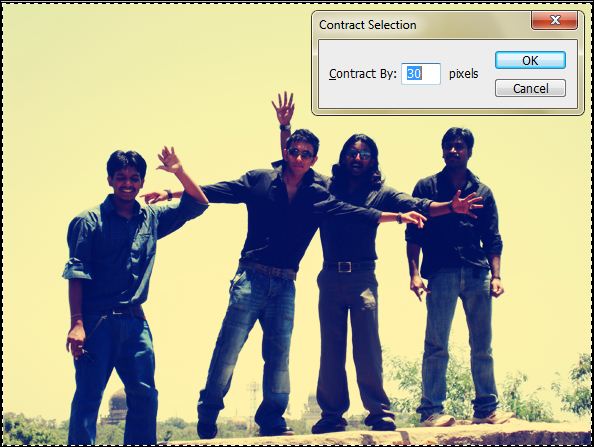
- you will get perfect rectangle according to your image. Press Ctrl + SHIFT + I
You can see a border rectangle selection, fill it with black or white.
Comments are appreciated !

Sign up for 70-432 course to successfully pass 642-524 exam plus download 70-662 prep material for next level exam.

0

Written By: Sri Ganesh.M

Rebel By Nature =) Founder and Editor of this blog. Share Knowledge and Inspiration through this Blog and vice versa.., This is a blog run by designers for the betterment of designers. You can Find me here : " Google plus " | Twitter | Facebook

  • Sipi Sagar

    Nice one Ganesh. Really looks like Subramaniyapuram movie style.

  • Pingback: Tweets that mention Quick-tip: Create a Vintage effect in 2 Steps » Image, Preview, Optional, Step, Create, From » AnimHuT -- Topsy.com

  • http://geniusgeeks.com Ricky

    Good tutorial. Stumbled!!!
    .-= Ricky´s latest blog ..Vodafone Brings iPhone 4 To India =-.

    • http://www.animhut.com/ Sri Ganesh.M

      thanks for the Su vote up brother :D

  • http://webexpedition18.com Nikola Lazarevic

    Lovely tip!
    .-= Nikola Lazarevic´s latest blog ..When Creativity Meets Minimalism: A Collection Of 30 Minimalistic Advertisements =-.

    • http://www.animhut.com/ Sri Ganesh.M

      thanks nikola

  • http://www.animhut.com karthikeyan

    very simple tutorial. looking vintage like exactly

  • http://machoarts.com/ suraj

    Nice tutorial, it is giving feel like I am in 60′s lol
    .-= suraj´s latest blog ..Photoshop Tutorial: Icy effect to Text =-.

    • http://www.animhut.com/ Sri Ganesh.M

      yes, this is a quick tip, soon we write how to make retro and vintage in detail

  • http://www.admixweb.com Holly

    Cool Tip! Thanks!

    • http://www.animhut.com/ Sri Ganesh.M

      thanks for the comment holly

  • http://www.krop.com/ariarsyadi/ Ari Arsyadi

    This is simple yet very useful. Thanks.

  • http://www.92pixels.com Arslan

    that was quick, thanks

  • http://www.vse-ok.com/ CPU

    Thanks for post, these seem very helpful tutorial for retro style!

  • http://www.flickr.com/vijayasri Vijayasri Sanjevi

    nice and easy steps :)

  • http://www.geekrevealed.com Geek Revealed

    Ganesh, It was simply the best tutorial i have ever read!! M Surely gonna try this!!

Our Advertisers :

Subscribe to AnimHuT (it’s Free)

Add Animhut on  Google plus animhut Free  Email Subscription for design updates animhut on twitter Animhut rss subscription for latest Updates Join our Official  Facebook Page Animhut Flickr Pool

Our Facebook Official Page
Follow @animhut

Latest Post From the Blog

  • Blog Article: How to Find the Top Talent for your Start-up
  • 2012 Facebook Update: New Image Slideshow like Google Plus
  • Today’s Google Doodle : Charles Dickens 200th Birthday
  • Inspiration: 2012 Fresh Caricature on Popular Celebrities
  • Inspiration: Mid 1970′s like Illustrations by Jorge Mascarenhas
  • Miniature Wonderland – Creative Macro Photography Inspiration
  • Inspiration: Innovative and Creative Motion Reel by Jimmy Yuvan

Archives

Community News

  • Etched text effect using Photoshop

    Here is a very easy to follow tutorial to help you easily do it for any kind of color booklet…

  • 10 Best Clothing Website Designs

    Clothes were made initially to keep us warm and also function as a form of protection. However, since then it…

  • 35 Charming and Romantic Wallpapers That Make You Fall In Love

    Love is the most important part in ones life. Even today, in these turbulent times, love always finds a way…

  • Computers Arts Collection Vol 1 – Graphic Design

    Computer Arts Collection is brand new annual series of six comprehensive guides coming from the authors of Computer Arts, and…

  • 20 Cool Battery PSD Templates, Icons, Tutorials

    PSD Templates are an important element which contributes to impressive and effective graphic design. Creating an battery icon isn’t easy…

●● We Recommended ●●


● Best Web Hosting Review
● Best Web Host Companies
● Review BlueHost
● China wholesale
● factory
● Free Website Design
● Website builder
●Mactheripper
● Coupon Codes
• Freelance Web Designer
• Direct TV Packages
● InternetPhonePackage.com
•Best WordPress Themes
•iPage Web Hosting
● Web Hosting Services
●Youtube to MP3

Search by Tags

ANIMHUT art history Articles caricature character design Contest Daily Photography Daily photos design history digital painting Flickr Freebies Funny Videos google google doodles graphic design Icons illustration Illustrator InfoGraphics Inspiration Inspriation mascot Patterns Photography Photogrphy Photoshop Photoshop tutorial Poster Project365 Quick-Tip Review roundup sriganesh stock image stress buster Texture Tutorial twitter VECTORS Videos Viral Video Wallpaper Wordpress wordpress theme

Hall of Fame :

Friends

  • AdmixWeb
  • ArtAtm
  • BloggerJet
  • CreativeOverflow
  • DesignModo
  • Designrfix
  • Desizntech
  • Graphik Design Agency
  • Logolitic
  • Orphicpixel
  • premiumpress coupon code
  • Skyje
  • Smashingshare
  • Underworldmagazines
  • Visionwidget
  • Webdesignfan
  • Webexpedition18

Pages

  • DESIGN NEWS
  • Who We are ?
    • Authors
  • | CONTACT |
  • Site Map
  • Follow us
    • Google +
    • Like AnimHuT fan page
    • @animhut (Twitter)
    • StumbleUpon Profile
    • Add me on Facebook

© 2009-2012 AnimHuT | Designed by Elegant Themes | Powered by WordPress| Sherweb