AnimHuT
  • Articles
    • Other Topics
    • Picture Of The Day
    • Review
    • Viral Videos
  • Contest
  • Freebies
    • Brushes
    • Font
    • Icons
    • Infographics
    • Patterns
    • Photoshop PSD
    • Textures
    • VECTORS
    • Wallpaper
  • Inspiration
  • Photography
  • Themes
    • Plug-ins
    • WordPress Themes
  • Tutorial
    • After Effects
    • Codex
    • Flash
    • Illustrator
    • Photoshop
      • Text Effects
    • Quick-Tip
Home » Photoshop » Quick Tip: Create Vignette Photo Effect in Photoshop in 2 steps
Jun23 11
Quick Tip: Create Vignette Photo Effect in Photoshop in 2 steps

Quick Tip: Create Vignette Photo Effect in Photoshop in 2 steps

Posted by Sri Ganesh.M in Photoshop, Quick-Tip, Tutorial

email
print

In this tutorial we are going to learn how to create Vignette photo effect in Photoshop in just 2 steps.
we wrote tutorial on Creating a vintage effect in 2 steps in our last post. And it was popular among readers, so here our post on photo effect in Photoshop in just 2 steps.
Vignette effect: these effects are occurred by often an unintended and undesired effect caused by camera settings or lens limitations. Later they are used in Morden digital word for design and photography to do creative effects.
More from Wikipedia:

In photography and optics, vignetting (from French “vignette”, pronounced /vɪnˈjɛtɪŋ/) is a reduction of an image’s brightness or saturation at the periphery compared to the image centre. The word vignette, from the same root as vine, originally referred to a decorative border in a book. Later, the word came to be used for a photographic portrait which is clear in the centre, and fades off at the edges. A similar effect occurs when filming projected images or movies off a projection screen. The resulting so-called “hotspot” effect defines a cheap home-movie look where no proper telecine is used. However, it is sometimes purposely introduced for creative effect, such as to draw attention to the center of the frame. A photographer may deliberately choose a lens which is known to produce vignetting to obtain the effect, or it may be introduced with the use of special filters or post-processing procedures.

Final preview:

Step : 1
Open any image in Photoshop, we have used black and white, you can use colour image also.

Step:2
Create a New layer [ Ctrl+Shift+N ] . Now select the Elliptical marquee tool { M } and feather option from 50-80px ( remember the feather option is according to your image ).
note: you can try rectangular marquee tool in some images.
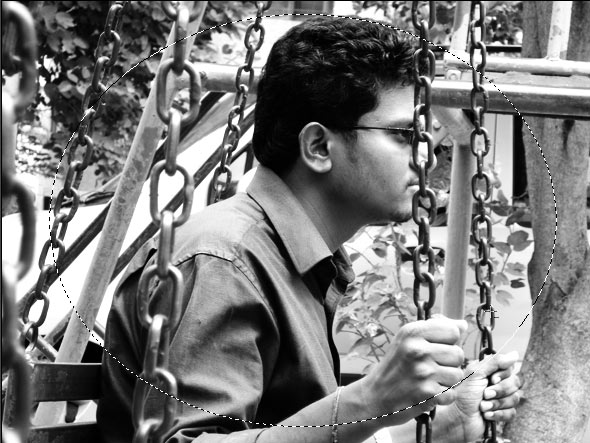
Press { Ctrl+ Shift+ I } or select -> inverse and fill it with black color #000000
. You are done !! now is that easy.
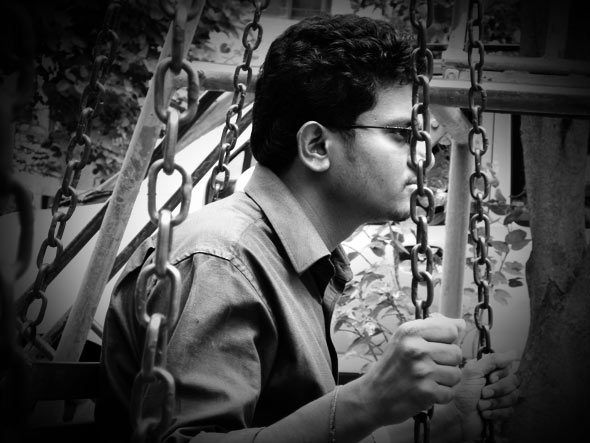
Option step : Create a border
Create a new layer and press Ctrl+A and with the selection press Alt+S+M+C and give appropriate pixel value :20px here

final preview - Sipi Sagar.V

We have planned to make photo effect tutorial without Photoshop Action, so Stay tuned and Subscribe to our Rss Feed .
Some Examples:
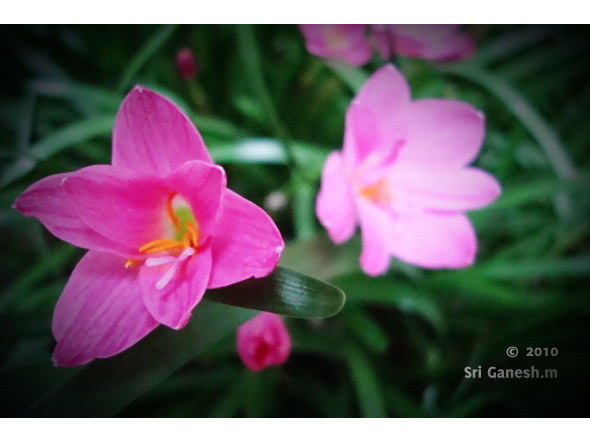
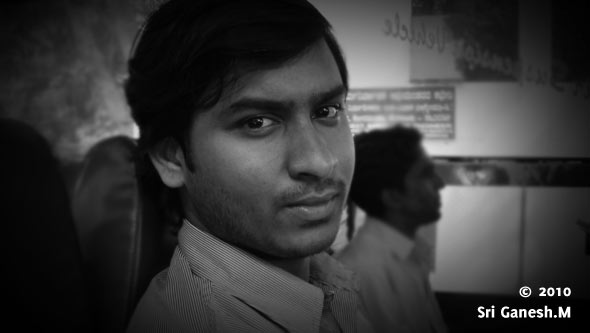

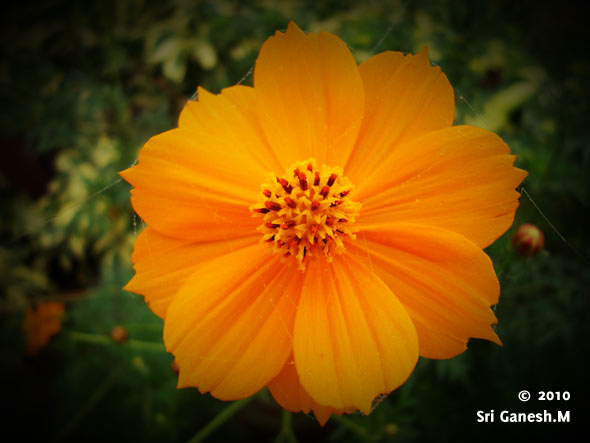
Hope you like this tutorial , spare some time for vote and comment on this post!!

0

Written By: Sri Ganesh.M

Rebel By Nature =) Founder and Editor of this blog. Share Knowledge and Inspiration through this Blog and vice versa.., This is a blog run by designers for the betterment of designers. You can Find me here : " Google plus " | Twitter | Facebook

  • http://geniusgeeks.com Ricky @twitter apps

    Thanks for the tutorial. BTW who is the guy in the picture?
    .-= Ricky @twitter apps´s latest blog ..Download Kaspesky Mobile Security 9 With Legal License Key For Free =-.

    • http://www.animhut.com/ Sri Ganesh.M

      thats ,my friend Sipi sagar. and another person in the photo is Karthickayen (authors)

      • http://www.animhut.com/ Sri Ganesh.M

        both are friends and classmate :D

  • http://webexpedition18.com Nikola Lazarevic

    nice and easy, thanks!
    .-= Nikola Lazarevic´s latest blog ..Things Designers Can Learn and Be Inspired by Biggest Tennis Tournament Wimbledon =-.

  • http://www.wplatte.com Claudia

    Easy yet very effective…I like it!
    .-= Claudia´s latest blog ..Design Folio =-.

  • http://richworks.in Richie

    Good tutorial guys…. but the official way to create a vignette effect (based on realistic calculations) is by adding a Lens Filter which can be found under the Filter Drop down menu.

    You can even set the focal length and depth using that filter.. Once your vignette filter has been created, just copy it onto your picture and set the blending mode to Multiply …….. just a thought :)

    But as you said, this is quicker …Thanks for the tutorial btw :)
    .-= Richie´s latest blog ..Unraveling the science behind the Photoshop Blend Modes – 1 =-.

  • http://www.underworldmagazines.com julio Rivera

    this was really awesome great post and great tutorial
    .-= julio Rivera´s latest blog ..Weekly Inspiration: 7 Design Agencies With Creative Projects – N.11 =-.

  • Pingback: Skapa snabbt och enkelt en snygg ram-effekt i Photoshop | Updt.se

  • Zurte.com

    Great effect! Simple but still very nice. Please check out our site Zurte.com for interesting links about Photoshop. I think you guys will fins a lot of nice Photoshop tutorials at our site: http://zurte.com/?s=Photoshop

  • Pingback: Haziran 2010′un En İyi Photoshop Dersleri | Tasarim8.com

  • Pingback: 180+ Fresh Useful Articles for Web Designers and Developers! | tripwire magazine

  • Pingback: Tweets that mention Quick Tip: Create Vignette Photo Effect in Photoshop in 2 steps » Photoshop, Create, Later, Vignette, AltSMC, CtrlA » AnimHuT -- Topsy.com

  • http://www.gtricks.com Aery

    Cool – vignette effect is really cool.

  • Simsage

    Hey thanks real cool effect,

  • http://www.92pixels.com Arslan

    nice effect buddy

  • Pingback: The only time you should ever fake it - The Good Eye Project

  • Pingback: why you need Deviantart ?-Celebrate with their Holiday Gifts | AnimHuT

Our Advertisers :

Subscribe to AnimHuT (it’s Free)

Add Animhut on  Google plus animhut Free  Email Subscription for design updates animhut on twitter Animhut rss subscription for latest Updates Join our Official  Facebook Page Animhut Flickr Pool

Our Facebook Official Page
Follow @animhut

Latest Post From the Blog

  • Blog Article: How to Find the Top Talent for your Start-up
  • 2012 Facebook Update: New Image Slideshow like Google Plus
  • Today’s Google Doodle : Charles Dickens 200th Birthday
  • Inspiration: 2012 Fresh Caricature on Popular Celebrities
  • Inspiration: Mid 1970′s like Illustrations by Jorge Mascarenhas
  • Miniature Wonderland – Creative Macro Photography Inspiration
  • Inspiration: Innovative and Creative Motion Reel by Jimmy Yuvan

Archives

Community News

  • Etched text effect using Photoshop

    Here is a very easy to follow tutorial to help you easily do it for any kind of color booklet…

  • 10 Best Clothing Website Designs

    Clothes were made initially to keep us warm and also function as a form of protection. However, since then it…

  • 35 Charming and Romantic Wallpapers That Make You Fall In Love

    Love is the most important part in ones life. Even today, in these turbulent times, love always finds a way…

  • Computers Arts Collection Vol 1 – Graphic Design

    Computer Arts Collection is brand new annual series of six comprehensive guides coming from the authors of Computer Arts, and…

  • 20 Cool Battery PSD Templates, Icons, Tutorials

    PSD Templates are an important element which contributes to impressive and effective graphic design. Creating an battery icon isn’t easy…

●● We Recommended ●●


● Best Web Hosting Review
● Best Web Host Companies
● Review BlueHost
● China wholesale
● factory
● Free Website Design
● Website builder
●Mactheripper
● Coupon Codes
• Freelance Web Designer
• Direct TV Packages
● InternetPhonePackage.com
•Best WordPress Themes
•iPage Web Hosting
● Web Hosting Services
●Youtube to MP3

Search by Tags

ANIMHUT art history Articles caricature character design Contest Daily Photography Daily photos design history digital painting Flickr Freebies Funny Videos google google doodles graphic design Icons illustration Illustrator InfoGraphics Inspiration Inspriation mascot Patterns Photography Photogrphy Photoshop Photoshop tutorial Poster Project365 Quick-Tip Review roundup sriganesh stock image stress buster Texture Tutorial twitter VECTORS Videos Viral Video Wallpaper Wordpress wordpress theme

Hall of Fame :

Friends

  • AdmixWeb
  • ArtAtm
  • BloggerJet
  • CreativeOverflow
  • DesignModo
  • Designrfix
  • Desizntech
  • Graphik Design Agency
  • Logolitic
  • Orphicpixel
  • premiumpress coupon code
  • Skyje
  • Smashingshare
  • Underworldmagazines
  • Visionwidget
  • Webdesignfan
  • Webexpedition18

Pages

  • DESIGN NEWS
  • Who We are ?
    • Authors
  • | CONTACT |
  • Site Map
  • Follow us
    • Google +
    • Like AnimHuT fan page
    • @animhut (Twitter)
    • StumbleUpon Profile
    • Add me on Facebook

© 2009-2012 AnimHuT | Designed by Elegant Themes | Powered by WordPress| Sherweb
